
Joulz
API key and sub code from the Joulz e-Dataportal.
Joulz is a commercial metering service for large consumption connections in the Netherlands.
API key
Joulz checks access with an API key. You create it in the Joulz e-Dataportal, and it belongs to the IP address of the server that collects the metering data: the Meterbeheer server. The correct IP address is below.
You create an API key only once per e-Dataportal, even when Meterbeheer reads several meters with it.
Sub code
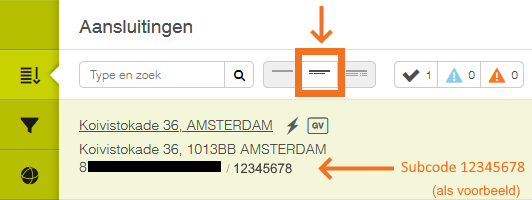
Besides the (public) EAN of a connection, Joulz uses a sub code as an extra check. The sub code is unique per connection and is listed with the connection in the e-Dataportal. Look up the sub code of every connection that Meterbeheer should read.
Log in to the e-Dataportal
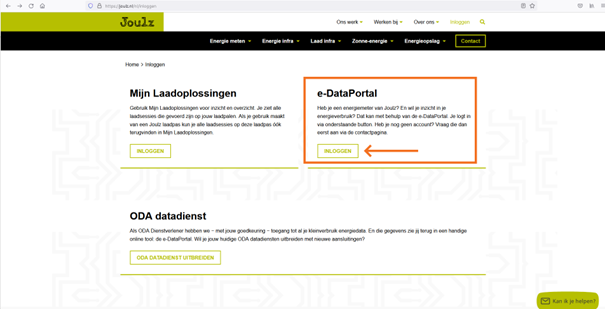
Step 1. Go to the e-Dataportal through joulz.nl.
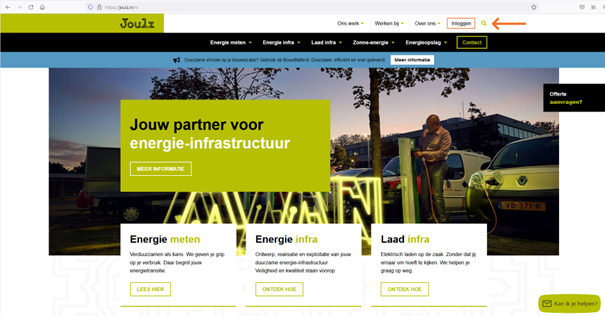
Step 2. Log in.
Create the API key
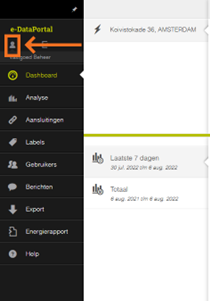
Step 3. Click the person icon at the top left.
Step 4. Click the black gear icon.
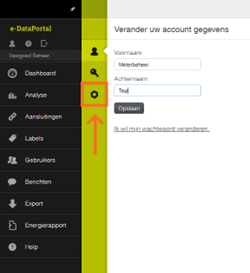
Step 5. Enter the IP address of the Meterbeheer server: 116.203.112.240, and click Maak API Key (Create API key).
Enter exactly this IP address. Joulz shows the API key only once: keep it in a safe place.
Look up the sub code
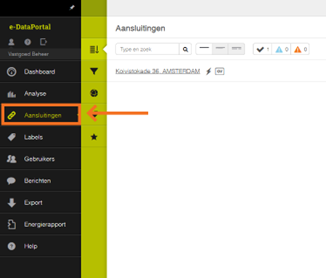
Step 6. Open the Aansluitingen (Connections) page in the e-Dataportal.
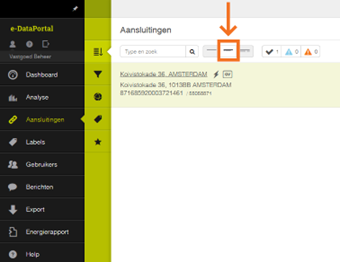
Step 7. Click the highlighted icon to show the sub code of a connection.
Channels
Electricity
- consumption: consumption per quarter hour (kWh)
- production: feed-in per quarter hour (kWh)
Gas
- consumption: consumption per hour (m3)
Historical data
When you add a meter, Meterbeheer collects over 2.5 years of data, as far as Joulz has it. Is data missing from the feed? Then contact Joulz at klantenservice@joulz.nl.
Error messages
When Meterbeheer cannot collect data, Joulz returns an error message. It is shown in the Meterbeheer dashboard on the meter's page and, with API+, in the feed of the connection as well.